Home Office Lighting Guide — How to Light Your Workspace for Maximum Productivity
Working from home has become the norm for millions of people, but many still struggle with one critical element: lighting. Poor lighting doesn’t just strain your eyes—it affects your mood, energy levels, and productivity. According to a study by the American Society of Interior Designers, 68% of employees complain about the lighting in their offices, and home offices are often even worse.
The good news? With the right lighting strategy, you can transform your workspace into a place where you feel energized, focused, and comfortable all day long. In this guide, I’ll walk you through the science of lighting, the three essential layers every home office needs, and practical tips to optimize your setup—no matter your budget or space constraints.
WHY HOME OFFICE LIGHTING MATTERS
Before we dive into the “how,” let’s talk about the “why.” Lighting affects you in three major ways:
1. Eye Health & Comfort
Poor lighting forces your eyes to work harder, leading to digital eye strain (also called Computer Vision Syndrome). Symptoms include headaches, blurred vision, dry eyes, and neck pain. The American Optometric Association reports that 58% of adults experience digital eye strain from prolonged screen use in poorly lit environments.
2. Circadian Rhythm & Energy
Your body’s internal clock (circadian rhythm) is heavily influenced by light exposure. Bright, cool light in the morning signals “wake up,” while warm, dim light in the evening signals “wind down.” Working in a poorly lit space—especially with only overhead lighting—can disrupt this rhythm, leaving you feeling sluggish during the day and wired at night.
3. Productivity & Mood
Research from Cornell University found that workers in well-lit offices reported an 84% reduction in eyestrain, headaches, and blurred vision, leading to a 2% increase in productivity. While 2% might sound small, over a year, that’s an extra 5 workdays of output. Plus, good lighting simply makes you feel better—natural light exposure is linked to improved mood and reduced symptoms of depression.
THE THREE LAYERS OF HOME OFFICE LIGHTING
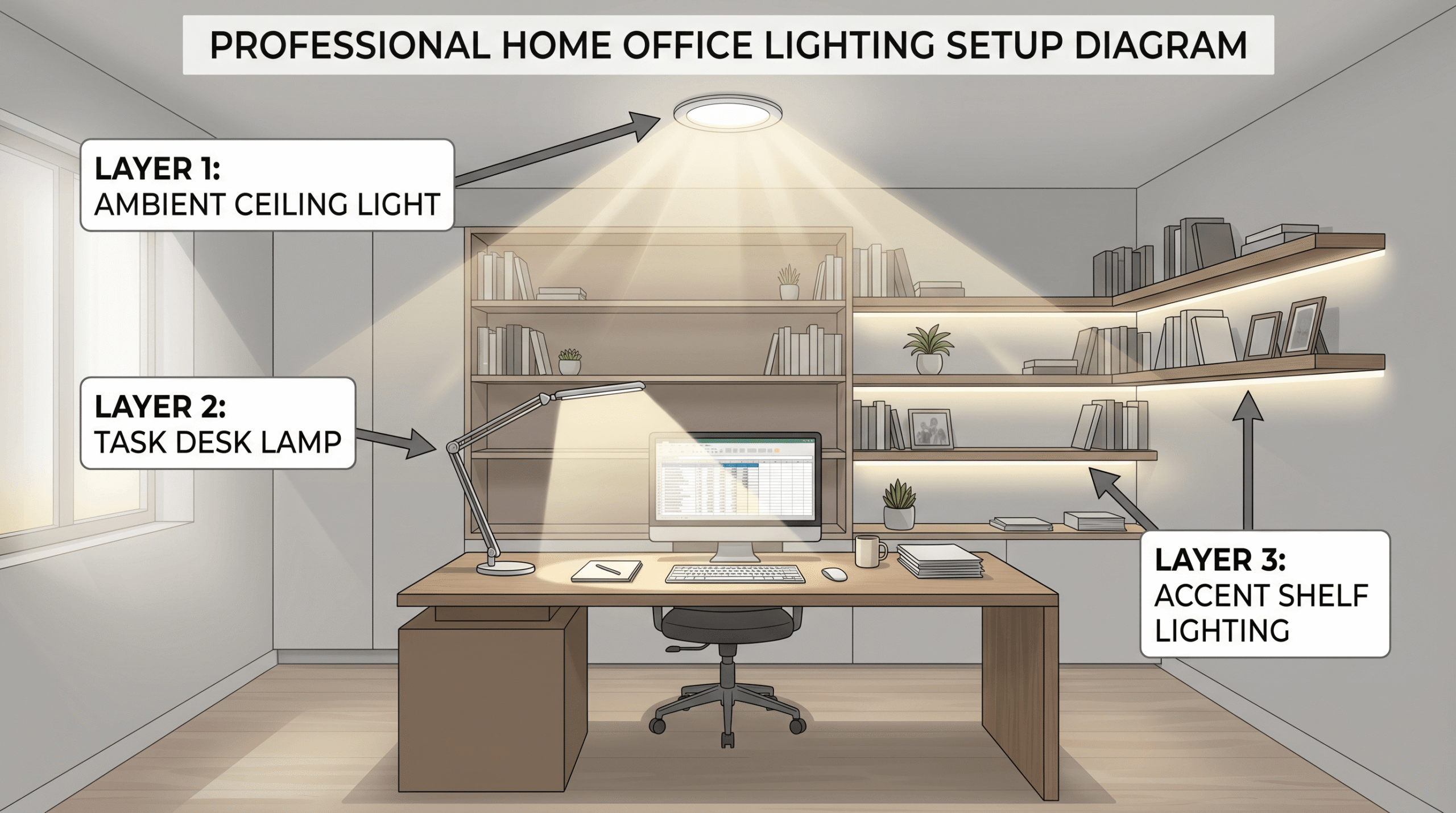
Professional lighting designers use a “layered lighting” approach, combining three types of light to create a balanced, functional space. Your home office should have all three:
Layer 1: Ambient Lighting (General Illumination)
What it is: The main source of light in the room, usually from ceiling fixtures or large lamps.
Purpose: Provides overall brightness so you can safely move around and see the entire space.
Common sources:
- Ceiling-mounted fixtures (flush mount, semi-flush, or pendant lights)
- Recessed lighting (can lights)
- Floor lamps with upward-facing shades
Best practices:
- Aim for 300-500 lumens per square meter for general office work
- Use diffused light (avoid harsh, direct overhead lights that create shadows)
- Install a dimmer switch to adjust brightness throughout the day
Pro tip: If your home office has only one harsh overhead light, add a floor lamp with a fabric shade to soften the light and reduce glare.
Layer 2: Task Lighting (Focused Work Light)
What it is: Directional light aimed at your specific work area—your desk, keyboard, or documents.
Purpose: Provides extra brightness where you need it most, reducing eye strain during focused tasks.
Common sources:
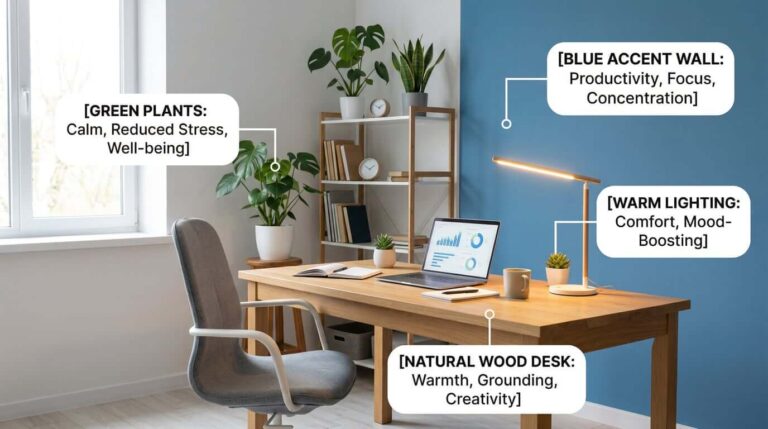
- Desk lamps (adjustable arm lamps, banker’s lamps, or LED desk lamps)
- Under-cabinet lighting (if you have shelves above your desk)
- Clip-on lamps for monitors or laptops
Best practices:
- Position the lamp to the side of your dominant hand (left side if you’re right-handed) to avoid casting shadows while writing
- Use LED bulbs with 400-500 lumens for reading and computer work
- Choose lamps with adjustable arms or heads so you can direct light exactly where you need it
- Avoid placing the lamp directly behind your monitor (creates screen glare)
Pro tip: Look for desk lamps with color temperature adjustment (warm to cool light) so you can match the light to the time of day.
Layer 3: Accent Lighting (Mood & Depth)
What it is: Decorative lighting that adds visual interest and reduces harsh contrasts in the room.
Purpose: Creates a more inviting atmosphere and prevents the “spotlight effect” where your desk is bright but the rest of the room is dark (which strains your eyes).
Common sources:
- Table lamps on shelves or side tables
- LED strip lights behind monitors or under shelves
- Picture lights or wall sconces
- Candles or decorative string lights (for ambiance, not work)
Best practices:
- Use accent lighting to fill in dark corners and balance the room’s brightness
- Keep accent lights dimmer than task lights (they’re for mood, not work)
- Avoid colored lights during work hours (stick to warm white or soft white)
Pro tip: Adding a small lamp on a bookshelf behind you creates depth and makes video calls more flattering (you’ll have a soft backlight instead of a dark silhouette).
CHOOSING THE RIGHT LIGHT BULBS
Not all light bulbs are created equal. Here’s what to look for:
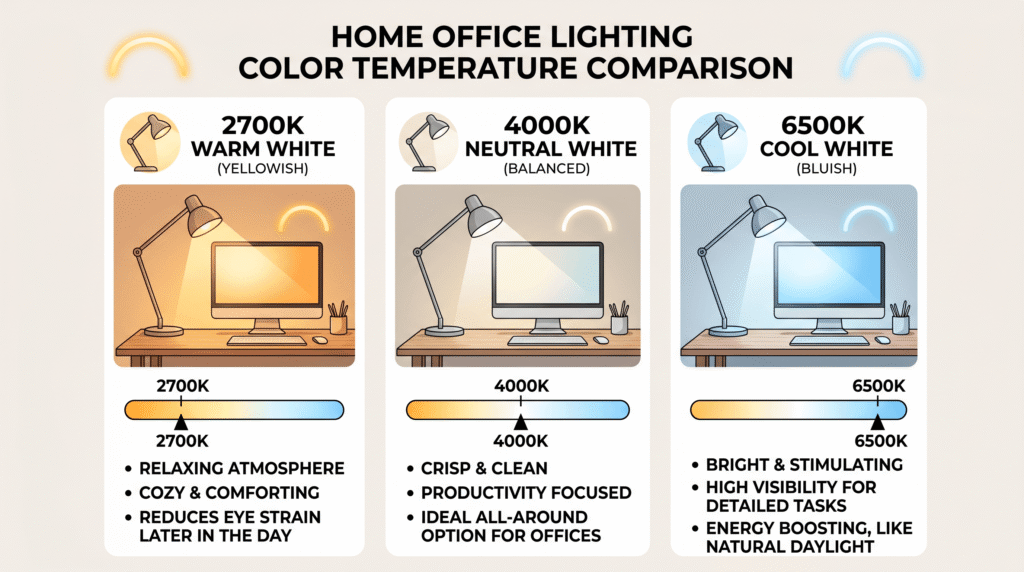
Color Temperature (Measured in Kelvin)
- 2700K-3000K (Warm White): Cozy, yellowish light—best for evening relaxation, not ideal for focused work
- 3500K-4100K (Neutral White): Balanced, natural light—great for all-day work
- 5000K-6500K (Cool White/Daylight): Crisp, bluish light—boosts alertness, best for morning work or detailed tasks
My recommendation: Use 4000K (neutral white) for task lighting and 2700K (warm white) for ambient/accent lighting. This gives you bright, clear light at your desk while keeping the room feeling warm and inviting.
Brightness (Measured in Lumens)
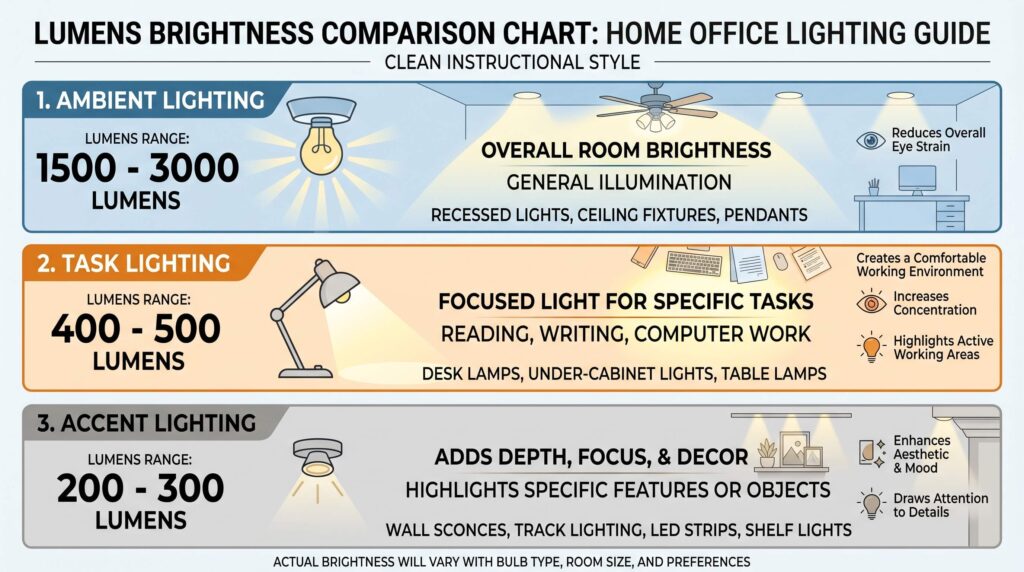
- Ambient lighting: 1500-3000 lumens (for a 100-150 sq ft office)
- Task lighting: 400-500 lumens (desk lamp)
- Accent lighting: 200-300 lumens (decorative lamps)
Pro tip: Avoid using wattage to judge brightness—lumens are the accurate measure. A 10W LED bulb can produce the same lumens as a 60W incandescent bulb.
CRI (Color Rendering Index)
CRI measures how accurately colors appear under a light source (scale of 0-100). For home offices, aim for CRI 80+ (90+ is ideal). This ensures your screen colors look true and reduces eye strain.
NATURAL LIGHT: THE GOLD STANDARD
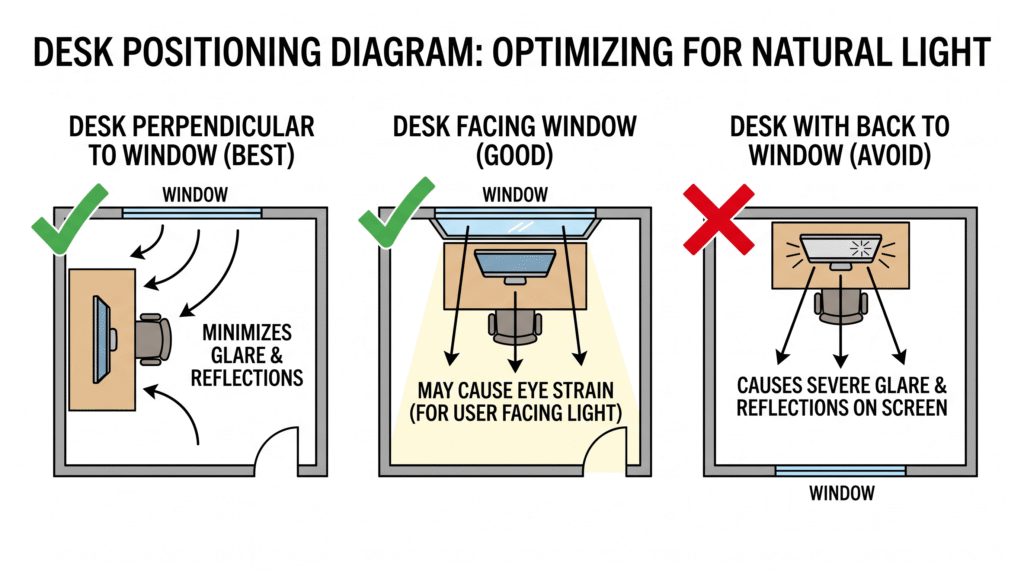
No artificial light can fully replace natural sunlight. Here’s how to maximize it:
Window Placement Strategy
- Best: Desk perpendicular to the window (light comes from the side)
- Good: Desk facing the window (but use sheer curtains to diffuse direct sunlight)
- Avoid: Desk with your back to the window (creates screen glare and backlighting issues for video calls)
Glare Control
- Install sheer curtains or blinds to diffuse harsh midday sun
- Use an anti-glare screen protector on your monitor
- Position your monitor so windows are not directly behind or in front of it
Seasonal Adjustments
- Winter/cloudy days: Supplement with more task lighting (natural light is weaker)
- Summer/bright days: Use curtains to prevent overheating and glare
Pro tip: If your home office has no windows, use a full-spectrum LED bulb (5000K-6500K) in your desk lamp to mimic daylight. Some studies suggest this can help regulate your circadian rhythm even without natural light.
COMMON HOME OFFICE LIGHTING MISTAKES
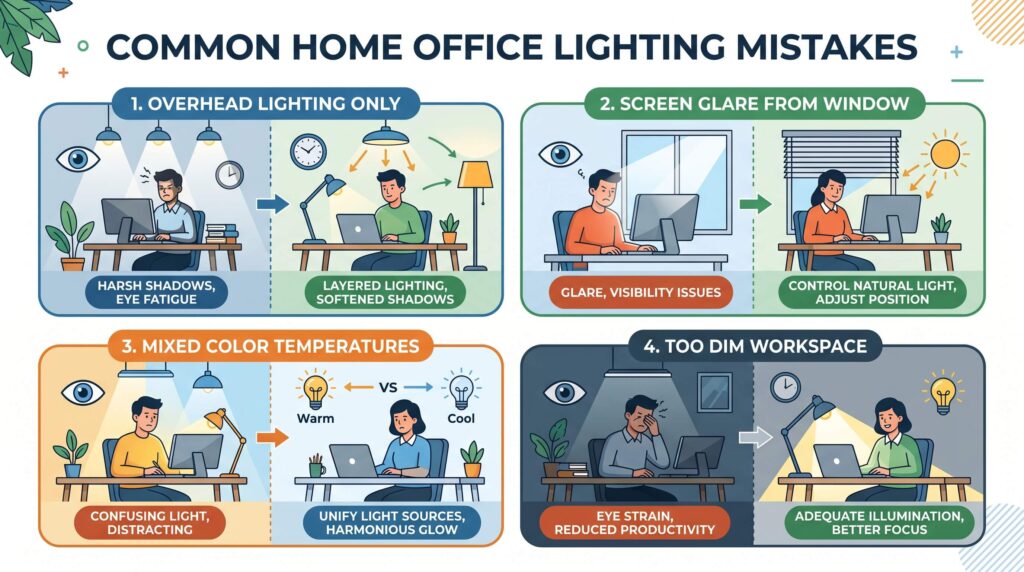
Mistake #1: Relying Only on Overhead Lighting
The problem: Overhead lights create harsh shadows on your face and desk, and they don’t provide enough focused light for computer work.
The fix: Add a desk lamp for task lighting.
Mistake #2: Screen Glare
The problem: Light sources (windows or lamps) reflecting on your screen force your eyes to work harder.
The fix: Position your monitor perpendicular to windows, and place desk lamps to the side (not behind the screen).
Mistake #3: Inconsistent Color Temperatures
The problem: Mixing warm (2700K) and cool (6500K) bulbs in the same room creates visual discomfort.
The fix: Stick to one color temperature family—either all neutral (3500K-4100K) or all warm (2700K-3000K).
Mistake #4: Too Dim or Too Bright
The problem: A room that’s too dim causes eye strain; a room that’s too bright causes glare and headaches.
The fix: Use the “layered lighting” approach—ambient + task + accent—and install dimmers to adjust as needed.
Mistake #5: Ignoring Evening Lighting
The problem: Working under bright, cool light (5000K+) in the evening disrupts your sleep cycle.
The fix: After 6 PM, switch to warm, dim lighting (2700K-3000K) to signal your body it’s time to wind down.
BUDGET-FRIENDLY LIGHTING UPGRADES
You don’t need to spend hundreds of dollars to improve your lighting. Here are affordable fixes:
- Under $20: Replace your desk lamp bulb with a high-CRI, 4000K LED bulb
- Under $50: Buy an adjustable LED desk lamp with dimming and color temperature control
- Under $100: Add a floor lamp with a fabric shade for softer ambient lighting
- Under $150: Install smart bulbs (Philips Hue, LIFX) that let you adjust color temperature throughout the day
DIY hack: If you can’t afford new lamps, try this: Place a sheet of white paper or parchment paper over a harsh lamp shade to diffuse the light and reduce glare. (Just make sure the paper doesn’t touch the hot bulb!)
YOUR HOME OFFICE LIGHTING ACTION PLAN
Ready to upgrade your lighting? Follow this step-by-step plan:
Step 1: Assess Your Current Setup
- Stand in your office and take photos from different angles
- Note where shadows fall on your desk
- Check if your screen has glare at different times of day
Step 2: Identify What’s Missing
- Do you have ambient lighting? (overhead or floor lamp)
- Do you have task lighting? (desk lamp)
- Do you have accent lighting? (secondary lamps or LED strips)
Step 3: Prioritize Your Upgrades
- Most important: Task lighting (desk lamp)
- Second: Ambient lighting (floor lamp or ceiling fixture)
- Third: Accent lighting (decorative lamps)
Step 4: Choose the Right Bulbs
- Task lighting: 400-500 lumens, 4000K, CRI 80+
- Ambient lighting: 1500-3000 lumens total, 3000K-4000K
- Accent lighting: 200-300 lumens, 2700K-3000K
Step 5: Test and Adjust
- Work in your newly lit office for a week
- Note if you experience less eye strain or better focus
- Adjust lamp positions or bulb brightness as needed
FINAL THOUGHTS
Good lighting is one of the most underrated elements of a productive home office. You can have the perfect desk, the best chair, and a top-of-the-line monitor—but if your lighting is off, you’ll still feel tired, unfocused, and uncomfortable.
The key takeaway? Layer your lighting. Combine ambient, task, and accent lighting to create a balanced, flexible workspace that adapts to your needs throughout the day. Start with a quality desk lamp, optimize your natural light, and gradually add layers as your budget allows.
Your eyes (and your productivity) will thank you.
What’s your biggest home office lighting challenge? Let me know in the comments—I’d love to help you troubleshoot!